


 October 13, 2026
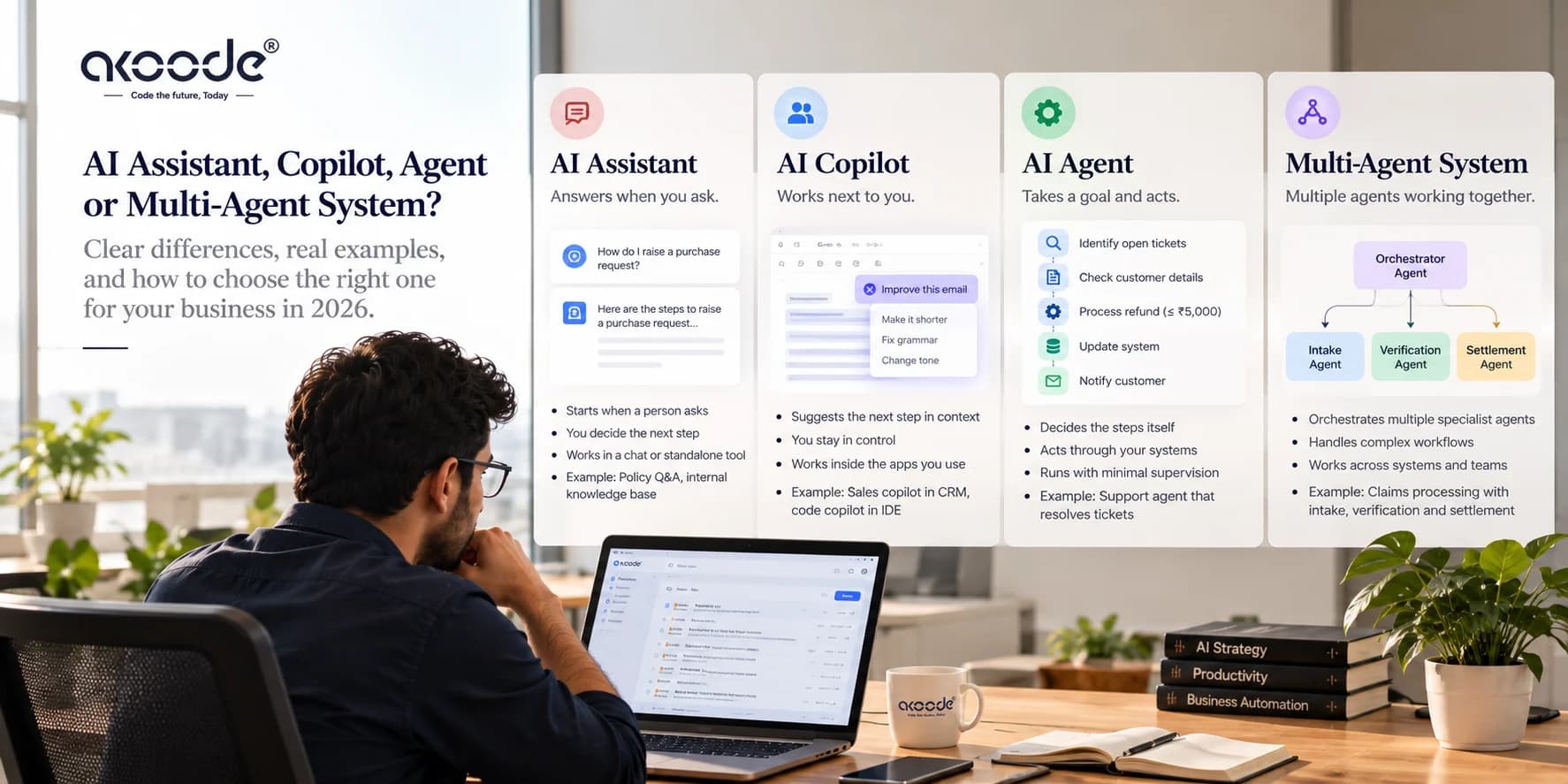
An AI assistant answers when you ask. An AI copilot works next to you inside an application and suggests the next step while you stay in charge. An AI agent takes a goal, decides the steps itself, acts through your systems and reports back. The difference is not how clever the model is. It is who decides what happens next, who is watching while it happens, and who is accountable when it goes wrong.
Most expensive mistakes in this area start with skipping that question. A team asks for an agent when a copilot would capture most of the value, or pays for an assistant and expects it to close tickets on its own. The vocabulary does not help, because vendors use the three words loosely and sometimes sell the same product under different labels at different prices. This guide gives you working definitions, a three-question test that settles any argument about a label, one business workflow designed all three ways, the security differences, and a six-factor framework for choosing before you spend budget.
The Short Answer in One Table
| AI assistant | AI copilot | AI agent | Multi-agent system |
|---|---|---|---|---|
Starts when | A person asks a question | A person is working in the app and the AI offers help in context | A goal or an event arrives | A goal or an event arrives |
Who decides the next step | The person | The person, with AI suggestions | The system, within set limits | An orchestrator and specialist agents |
Where it works | A chat window or standalone tool | Inside the application you are using | Across your systems through their APIs | Across systems, split by specialty |
Human role | Reads the answer and acts on it | Watches, steers and approves each action | Sets the goal, reviews outcomes, handles escalations | Sets policy and reviews exceptions |
Position on our autonomy scale | Level 0 to 1 | Level 1 to 2 | Level 2 to 3 | Level 4 |
Typical failure | A confident wrong answer | Suggestions accepted without checking | Several wrong steps before anyone notices | Errors passed from one agent to the next |
Example | A policy Q&A tool on your intranet | A sales copilot inside the CRM | A support agent that resolves tickets under a refund limit | A claims system with intake, verification and settlement agents |
A traditional chatbot sits below all four. It follows a script or matches intents, has no live data and takes no actions. The autonomy levels in the table come from the five-level scale in our guide to what agentic AI is.
Why the Labels Are So Confusing
Three definitions are in circulation, and they do not line up.
Google Cloud's explainer on AI agents treats an assistant as an agent packaged as a product for working directly with a user. In that framing assistants are reactive and depend on the user for direction, agents are goal-driven and more autonomous, and bots sit at the bottom running pre-programmed rules. Microsoft draws the line differently. It uses Copilot for the interface an employee talks to and agent for a process-level worker behind it, and it has said it expects every employee to have a copilot supported by many agents. Its own product lineup now calls several different things agents, from a no-code question-answering helper to an autonomous workflow runner.
Products also move. GitHub Copilot started as inline code completion, which is the textbook copilot pattern, and added agent capabilities in 2025. One brand now covers both ends of the spectrum.
Then there is marketing. In June 2025 Gartner named the practice of agent washing, which it described as rebranding existing products such as AI assistants, robotic process automation and chatbots without substantial agentic capability. Gartner estimated that only about 130 of the thousands of vendors claiming agentic AI were real. The same release forecast that over 40 percent of agentic AI projects would be cancelled by the end of 2027 because of rising costs, unclear business value or inadequate risk controls. Treat that figure as a forecast. It rests partly on a Gartner webinar poll of 3,412 attendees, not on a count of actual projects.
The practical lesson is to stop arguing about labels and test behaviour. Three questions do that.
Three Questions That Settle the Label
We call this the decide, watch, recover test. Run it on any product, including one you are about to buy.
Who decides the next step? If a person chooses every step, you are looking at an assistant or a copilot. If the system chooses the sequence from the situation in front of it, you are looking at an agent.
Who is watching while it runs? A copilot runs with someone present, who sees each suggestion and approves it. An agent runs while nobody is looking, and the report arrives afterwards.
What happens when it is wrong? With an assistant, the person catches the error before acting. With a copilot, the person catches it at the approval step. With an agent, the system has to catch it through validation, confidence thresholds and escalation, or the error lands in a real system.
The third question drives cost. Almost everything that makes agents harder to build, including evaluation, guardrails, monitoring and rollback, exists because the human is no longer the safety net.
What Is an AI Assistant?
An AI assistant is a language-model application that responds to requests in natural language, usually through chat or voice. It answers questions, drafts text, summarises documents and, when connected to your knowledge base, looks up company information. A person reads each response and decides what to do with it. The assistant never acts on its own.
That limit is also its safety property. An assistant that only reads and responds can be wrong, but it cannot update a record, send a message or move money. Its main risks are a confident wrong answer and, in company deployments, showing someone content they should not have seen. The second risk is an engineering problem with a known fix: retrieval that filters by the permissions of the person asking, applied before the model sees any text.
Assistants fit work where the value is information rather than action. Internal policy and HR questions, product documentation search, sales enablement, first drafts of routine documents and summaries of long threads are typical. A knowledge assistant built on retrieval-augmented generation over your own documents is the most common business version, and our RAG application development and AI chatbot development teams build them. If the question you are trying to answer is whether staff and customers can find what the company already knows, an assistant is usually enough, and an agent would be an expensive overreach.
What Is an AI Copilot?
An AI copilot is an assistant embedded in an application. It sees what the user is working on, suggests or drafts the next step in that context, and acts only when the user approves. The person and the AI work in the same session, on the same screen, and the person stays in control of every action.
Familiar examples include inline code completion in an editor, drafting inside a document tool, a sales copilot in a CRM that proposes the next action and writes the follow-up email for the rep to edit and send, and a clinical tool that flags regions on an image for the clinician to review. What makes each one a copilot is not the model. It is the placement: inside the workflow, with the current record or file passed in as context.
Copilots are often the best first step for three reasons. A person verifies each action, so errors get caught at the cheapest point. The copilot inherits the user's identity and permissions, so it cannot see or do more than the person can. And it ships inside software people already use, which makes adoption a matter of a new panel or button rather than a new habit.
The weakness is that the human becomes the bottleneck, and the benefit depends on that human actually catching mistakes. METR's randomized trial, published in July 2025, is a useful warning. Experienced open-source developers working on their own mature codebases took 19 percent longer to finish tasks when AI tools were allowed, yet afterwards estimated that the tools had made them about 20 percent faster. A copilot can feel productive without being productive. Measure time to complete and error rates on real work, not user satisfaction.
Building a good copilot is half AI and half product engineering: passing the right context from the screen, designing how suggestions appear and get accepted, and inheriting permissions correctly. That is why copilots for web and mobile apps draw on both our generative AI development and custom software development teams.
What Is an AI Agent?
An AI agent is a system that takes a goal, plans the steps to reach it, calls tools and APIs to carry them out, checks the results, and either finishes or escalates to a person. It runs a loop of decide, act and observe without a human approving each step. Our guide to what agentic AI is covers the four properties (planning, tool use, memory and iteration) and the loop in more detail.
Compared with a copilot, an agent adds three things. The first is initiative: it can start from an event, such as an invoice arriving or a lead form being submitted, instead of waiting for a person to open an application. The second is reach: it works across several systems through their APIs rather than inside one screen. The third is persistence: it carries state across many steps and keeps going while nobody is watching.
Those same three things explain why agents cost more to build and operate. Because nobody is signed in when it runs, an agent needs its own identity with scoped permissions. Because nobody is watching, it needs approval gates on consequential actions, validation on its outputs, step and cost limits per run, and a full trace of what it did. Because its accuracy cannot be judged by glancing at one answer, it needs an evaluation set built from your own history. Our enterprise AI agent architecture guide covers the build, and our AI agent development cost guide explains what moves the price.
Typical agents include support agents that resolve tickets under a set limit, finance agents that match and post invoices, sales agents that qualify inbound leads and update the CRM, and operations agents that process documents. We catalogue what is practical by sector in our guides to AI agents for finance and banking, healthcare, retail and e-commerce, real estate and logistics and supply chain.
When one agent is not enough, a multi-agent system coordinates several specialists, for example one agent for intake, one for verification and one for settlement. That adds coordination failures on top of the single-agent ones, which our guide to agentic AI orchestration covers. Most organisations need a single agent at level 2 or 3, not a coordinated team at level 4.
One Workflow, Three Designs: Invoice Matching
Take accounts payable. A supplier invoice arrives and has to be matched to a purchase order and a goods receipt before anyone pays it. Here is how the same job looks under each pattern.
| What the AI does | What the person does | Permissions | When there is a mismatch |
|---|---|---|---|---|
Assistant | Answers "does this invoice match PO 4471?" when asked, using data retrieved or pasted in, and explains the matching policy | Runs the check, makes the call and keys the result into the ERP | Read-only | The person notices it, or does not |
Copilot | Sits inside the accounts payable screen, pre-fills the match, highlights the fields that differ and drafts the query email to the supplier | Reviews each highlight, approves the posting or the email | Inherits the clerk's permissions | The clerk sees the flag and decides |
Agent | Picks up each incoming invoice, extracts the data, matches it against the PO and receipt, posts clean matches under a set limit and routes exceptions with a summary | Works the exception queue and reviews a sample of auto-posted items | Its own service identity, scoped to read POs and receipts and to post under the limit | Applies tolerance rules, then escalates with context. Anything over the limit waits for a human |
The model underneath can be identical in all three. The systems around it are very different. The assistant is the least work: retrieval and a chat interface. The copilot adds product and integration work: the screen, the context passing, the permission handling. The agent adds evaluation against historical invoices, tolerance rules, guardrails, monitoring and an exception process, which is where most of the effort goes.
The economics differ too. An agent pays back when invoice volume is high and exceptions are a minority. At low or irregular volume, a copilot captures most of the value at much lower risk.
The same split shows up elsewhere:
Customer support. An assistant answers questions from the knowledge base. A copilot inside the help desk drafts the reply and fills the ticket fields for the support person to approve. An agent resolves categories of ticket end to end under a refund limit and escalates the rest.
Sales. An assistant answers product questions for reps. A copilot inside the CRM suggests the next action and drafts the follow-up. An agent qualifies inbound leads, updates records, books meetings and hands warm leads to a rep.
How Each Pattern Maps to the Autonomy Scale
In what agentic AI is we set out five levels, from no autonomy at level 0 to coordinated multi-agent systems at level 4. Assistants sit at level 0 to 1, copilots at level 1 to 2, agents at level 2 to 3 and multi-agent systems at level 4.
The more useful point is that autonomy is set per action, not per product. Take the invoice agent above:
Reading PO and receipt data: autonomous
Extracting fields from the invoice: autonomous
Drafting the supplier query: autonomous
Sending that query: needs approval until the drafts have earned trust
Posting an invoice under the limit: autonomous
Posting an invoice over the limit: needs approval
One product, running at level 3 for reading and level 1 for paying. Writing the level down for each action in the requirements, instead of asking for an agent, removes most of the ambiguity in a project brief.
How the Security Model Changes at Each Step
Pattern | Identity it acts under | Main risks | What to design in |
|---|---|---|---|
Assistant | Usually read-only access | Wrong answers, and showing content the asker should not see | Permission-aware retrieval, answer grounding with sources, logging |
Copilot | The signed-in user, inside the session | Approving without reading, and sensitive context reaching a model provider | Permission inheritance, clear diffs before approval, data-handling rules for context sent to models |
Agent | Its own service identity, because nobody is signed in | Over-broad tool access and prompt injection, where text in an email, ticket or document steers the agent | Least privilege per tool, approval on state-changing actions, schema validation of outputs, audit logs, per-run step and cost limits |
The agent row deserves the most attention. An agent that reads untrusted content and holds write access is the combination to design around, because the content it reads can contain instructions written by someone else. Wording the prompt carefully does not solve this. Scoping the tools, validating outputs and gating consequential actions does. Our enterprise AI agent architecture guide goes through these controls in detail. None of this is a compliance guarantee. Legal and regulatory requirements depend on your sector and jurisdiction and need their own review.
How to Choose: Six Factors
Score the workflow on six factors. Each one pushes toward a copilot or toward an agent.
Factor | Points toward a copilot | Points toward an agent |
|---|---|---|
Task variability | Steps are mostly known, with judgment at a few points | The path varies by case and fixed rules cannot cover it economically |
Cost of an error | High, or hard to detect | Low or contained |
Reversibility | Hard to undo, such as payments, external messages or clinical decisions | Easy to undo or to run in a sandbox first |
Verifiability | A person's judgment is needed to check the result | The result can be checked automatically or sampled |
Volume | Low or irregular | High and steady, so review time dominates cost |
Integration readiness | Data and APIs are partly available, and on-screen context matters | Clean APIs, documented rules and labelled history to evaluate against |
Three decision rules follow from the table:
If the steps are fixed and the inputs are stable, build neither. Deterministic automation is cheaper, easier to test and does not drift.
If most factors land in the copilot column, build a copilot and instrument it so you record what people accept, edit and reject.
If most factors land in the agent column, build one agent at level 2 first, with a narrow scope and approval gates on anything consequential.
The route many teams take is copilot first, agent per action later. Every override a person makes inside a copilot is a labelled example for your evaluation set. When a specific action shows a low override rate over a period you chose in advance, you promote that action to autonomous. Set the threshold per action before you look at the numbers, so the decision is not made after the fact.
What Changes in Effort and Cost as Autonomy Rises
Pattern | Build effort | Testing and evaluation | Run cost drivers | Ongoing governance |
|---|---|---|---|---|
Assistant | Lowest: retrieval over your documents and a chat interface | Answer quality on real questions | Model calls and retrieval infrastructure | Keep source documents current |
Copilot | Moderate: adds in-app interface, context passing and permission inheritance | Acceptance and override rates, time to complete | Model calls per user action, growing with seats | Review what users accept without edits |
Agent | Highest of the three: adds integrations, scoped identity, tool definitions and approval gates | Evaluation set from your own history, plus per-step and end-to-end tests | Model calls per task, retries, and tool or API usage | Tracing, drift checks, a named owner and an escalation queue |
Multi-agent system | All of the above, plus coordination logic | Per-agent and whole-system evaluation | Multiplied by the number of agents and the pattern chosen | Cross-agent tracing and failure containment |
We do not publish price ranges here, because the number of integrations and the readiness of your data move the price more than the pattern does. The AI agent development cost guide lists the drivers. For an estimate on your own workflow, book a call.
Spotting Agent Washing Before You Sign
If a vendor says agent, ask for a demonstration of these six things. A good answer to each takes minutes and cannot be faked with a slide.
Show me a run in which a tool call failed. What did the system do next?
Show me the execution trace for one task. Can I see each decision it made?
Which steps did the system choose, and which did a developer wire in advance?
Under what identity does it act, and what exactly can it read and write?
What does it do when its confidence is low?
How do you measure accuracy, on whose data, and who built the test set?
A vendor selling a copilot or a well-built assistant can answer these honestly and still be a good choice. The problem starts only when the label promises more autonomy than the system has. The three tests in the "what makes a system agentic" section of our agentic AI guide are a quick companion to this list.
Common Mistakes
Buying an agent for a stable process. If the steps never change, automation does the job with less risk.
Giving an assistant write access and still calling it an assistant. The moment it can change something, it needs the controls an agent needs.
Judging a copilot by user satisfaction. Time to complete and error rate on real tasks are the numbers that matter.
Launching an agent without an evaluation set from your own history.Public benchmarks say nothing about your invoices, tickets or leads.
Treating the label as the specification. Write the autonomy level for each action into the requirements.
Where Systems We Have Built Sit on This Spectrum
None of the systems below is an autonomous LLM agent, and we would rather say so than stretch the label. They show how the same decision, who acts and who checks, plays out in production AI.
A dual-stream diagnostic model detects cervical spine fractures at individual vertebra level and classifies chest pathologies from X-rays, with 99.1 percent and 98.4 percent accuracy and under two seconds per study. It returns visual explanations and the clinician makes the decision. That is the copilot pattern, in a setting where an error costs the most.
An on-device pose analysis system built for M2 Method in the USA returns biomechanical feedback in under 300 milliseconds, with a rule engine configured through JSON. It advises in the moment and the person decides what to do with it, which is also closer to a copilot than to an agent.
A generative AI catalogue pipeline interprets a product image, writes structured marketing copy across formats and renders the assets deterministically, with six templates and nine style tones. It runs end to end without a person driving each step, so its mechanics are closest to an agent, but it follows a fixed pipeline instead of choosing its own steps.
For LLM agents that choose their own steps, the build is covered under AI agent development.
Frequently Asked Questions
What is the difference between an AI agent and an AI assistant?
An assistant responds when a person asks and leaves every decision and action to that person. An agent takes a goal, decides the steps, uses tools and APIs to act, checks its own results and escalates when needed. The practical difference is who decides the next step and who is watching while it runs. Agents need their own scoped permissions, evaluation and monitoring because no person is present to catch errors.
Is an AI copilot an AI agent?
Not in the usual sense. A copilot works inside an application, alongside the user, and acts only when the user approves each step. An agent works on delegated goals across systems and reports afterwards. Some vendors use the words interchangeably, and a copilot can be built on agent technology, so use the decide, watch, recover test on the actual product instead of relying on the name.
Is ChatGPT an assistant, a copilot or an agent?
In plain chat it behaves as an assistant: you ask, it answers, you decide. When you enable tools or agent features that let it plan and carry out several steps on a task, it behaves as an agent for that task. The same product can sit at different points on the scale depending on how it is configured and what permissions it holds.
Can an AI assistant be upgraded into an agent?
Technically yes: add tools, a loop, memory and permissions. In practice treat it as a new system, because the risk profile changes completely. An assistant that only reads becomes a system that writes, so it needs scoped identity, approval gates, evaluation on your own data and monitoring before it acts without a person watching.
Which is cheaper to build, a copilot or an agent?
Generally an assistant costs least, a copilot more, and an agent most, because agents add integrations, guardrails, evaluation and operations. But the number of integrations and the state of your data usually move the price more than the pattern does. A copilot that touches several systems can cost more than a narrow agent over one clean API. Estimate from your workflow, not from the label.
Should customer support start with a copilot or an agent?
Most teams do better starting with a copilot that drafts replies and fills ticket fields for the support person to approve. It captures time savings immediately and produces labelled data on what people accept or change. Then promote specific low-risk, high-volume ticket categories to an agent with a refund limit, keeping escalation for everything else.
What is agent washing?
Agent washing is Gartner's term, used in June 2025, for rebranding existing products such as AI assistants, robotic process automation and chatbots as agentic without substantial agentic capability. Gartner estimated that only about 130 of the thousands of vendors claiming agentic AI were real. Ask a vendor to show a failed tool call, the execution trace and which steps the system chose itself.
How much human oversight does an AI agent need?
At levels 2 and 3, oversight moves from every step to outcomes: approval on consequential or irreversible actions, regular review of a sample of automated work, an escalation queue for low-confidence cases, and monitoring of accuracy and cost. The amount should follow the cost of an error and how easily the action can be undone, and it can loosen action by action as evidence builds.
Start With One Workflow
The three patterns are designs, not ranks. Many organisations run all three: a copilot as the interface people use every day, assistants for knowledge lookup, and agents behind them handling the volume work. What matters is choosing per action, where the cost of an error and the speed of verification decide how much autonomy to grant.
At Akoode we start with the workflow, not the label. The first conversation covers who decides each step, who is watching, and what happens when the system is wrong. From there we pick the pattern for each action and build only as much autonomy as the evidence supports. Assistants and knowledge search come from our AI chatbot and RAG teams, copilots from generative AI and software development working together, and agents from AI agent development. The wider practice sits under our artificial intelligence development services.
Akoode is based in Gurugram (Spaze iTech Park, Sector 49) with a US office in Jenks, Oklahoma. We have delivered 180+ projects across 15+ industries and hold a 4.9 rating from 126 reviews on Google and a 5.0 rating on GoodFirms. If you have a workflow in mind, bring one and we will tell you which pattern fits, what it needs, and whether it needs AI at all.
Get In Touch Now
View More Our Blog