AI-Powered Quantity Takeoff Desktop Application for Construction Estimation
Built for Qualis Construction Ltd., a Canadian estimator whose manual blueprint counting process was too slow, too error-prone, and too exposed to data risk.
Time Reduction
80%
Platforms Supported
3 OS
Cloud Dependency
Zero Offline
When Manual Blueprint Counting Became the Bottleneck in Every Estimation Workflow
Construction estimation teams work against tight deadlines with large-format engineering drawings that can run to dozens of pages and hundreds of individual elements. Every door, window, outlet, sink, and fixture on those drawings needs to be counted accurately before a cost estimate can be produced. When that process is done manually, it is slow by definition, and fatigue-driven errors in a single session can cascade into costly mistakes that affect project bids, contractor relationships, and profit margins.
A Canadian construction and estimation firm came to Akoode with a workflow problem that their existing tools could not solve. Manual quantity takeoff was consuming hours of estimator time per project, and the accuracy of those counts depended entirely on individual concentration. They needed an AI-powered solution that could automate detection from architectural blueprints but could not risk uploading proprietary engineering drawings to a cloud service. The solution had to run entirely on local hardware.
Akoode built a cross-platform desktop application that uses a local AI backend to detect and classify architectural elements from uploaded blueprints automatically. Estimators drag and drop their drawings, the system processes them locally, and the output is a categorised quantity summary with line-item cost calculations ready for export as a professional report.
80%
Time Reduction
Quantity takeoff that previously took hours per page now completes in minutes with no manual counting required.
Zero
Cloud Dependency
All AI inference runs locally on the user's machine, keeping every engineering drawing fully private and off external servers.
3
Platforms Supported
The application runs natively on Windows, macOS, and Linux with all dependencies bundled inside the installer.
5
Detection Categories
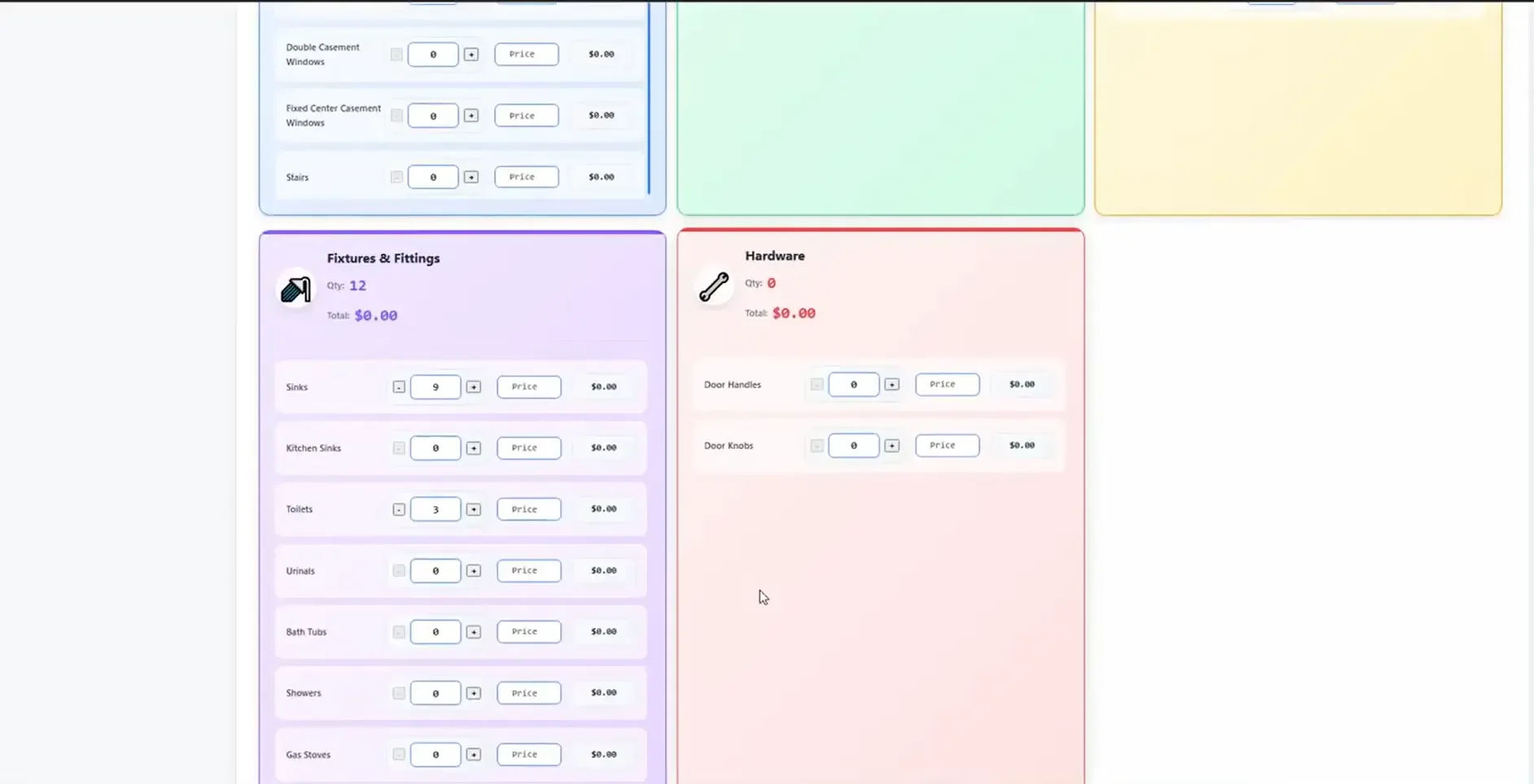
Architectural elements, MEP systems, furniture, fixtures and fittings, and hardware all detected and classified automatically.
Project Info
Client
Qualis Construction Ltd.
Industry
Construction & Real Estate
Use Case
Automated Blueprint Quantity Takeoff
Solution
AI and Computer Vision Desktop Application
Engagement
Fixed Cost
What Challenges Do Construction Estimation Teams Face With Manual Quantity Takeoff?
Quantity takeoff is one of the most time-intensive stages of construction estimation, and it is one of the most resistant to standard automation. Engineering drawings are large, dense, and proprietary. The elements that need counting are small, numerous, and visually similar across categories. Cloud-based AI tools introduce data security risks that firms working on sensitive or high-value projects cannot accept. The result is an industry where experienced estimators spend a disproportionate share of their time on a counting task that technology should have solved years ago.
Manual Counting Across High-Volume Multi-Page Blueprints
Estimators counting doors, windows, fixtures, and electrical elements across dozens of blueprint pages spend hours on a single project, with productivity dropping and error rates rising as fatigue sets in.
Human Error From Fatigue and Visual Repetition
Manually reviewing high-density architectural drawings leads to missed items, double counts, and inconsistencies between estimators reviewing the same drawing at different times.
Large High-Resolution PDFs That Standard AI Cannot Process
Blueprint files are often massive, high-resolution PDFs that exceed the input limitations of standard object detection models, making direct AI processing unreliable without specialist handling.
Data Privacy Risk From Cloud-Based Processing Tools
Engineering drawings contain proprietary project data. Uploading them to cloud-based AI APIs introduces security exposure that construction firms working on sensitive projects cannot accept.
An estimator spending four hours manually counting elements on a single blueprint set is not a productivity problem that better habits can fix. It is a workflow problem that only purpose-built automation can solve.
What We Set Out to Build
The brief required a production-ready desktop application that could automate quantity takeoff from architectural and engineering drawings, run entirely offline, and produce professional cost estimate outputs without requiring any cloud connectivity. Every objective connected directly to the operational reality of a construction estimator working with sensitive, large-format blueprint files under time pressure.
Automate Architectural Element Detection
Build an AI detection system capable of identifying and classifying doors, windows, fixtures, MEP elements, furniture, and hardware from uploaded blueprint drawings without manual input from the estimator.
Process Large High-Resolution Blueprints Accurately
Implement a processing architecture that handles massive, high-resolution PDF blueprints without losing detection accuracy on small elements across large page areas.
Deliver Complete Offline AI Processing
Ensure all AI inference runs locally on the user's machine with zero cloud dependency, keeping every engineering drawing within the client's own hardware environment at all times.
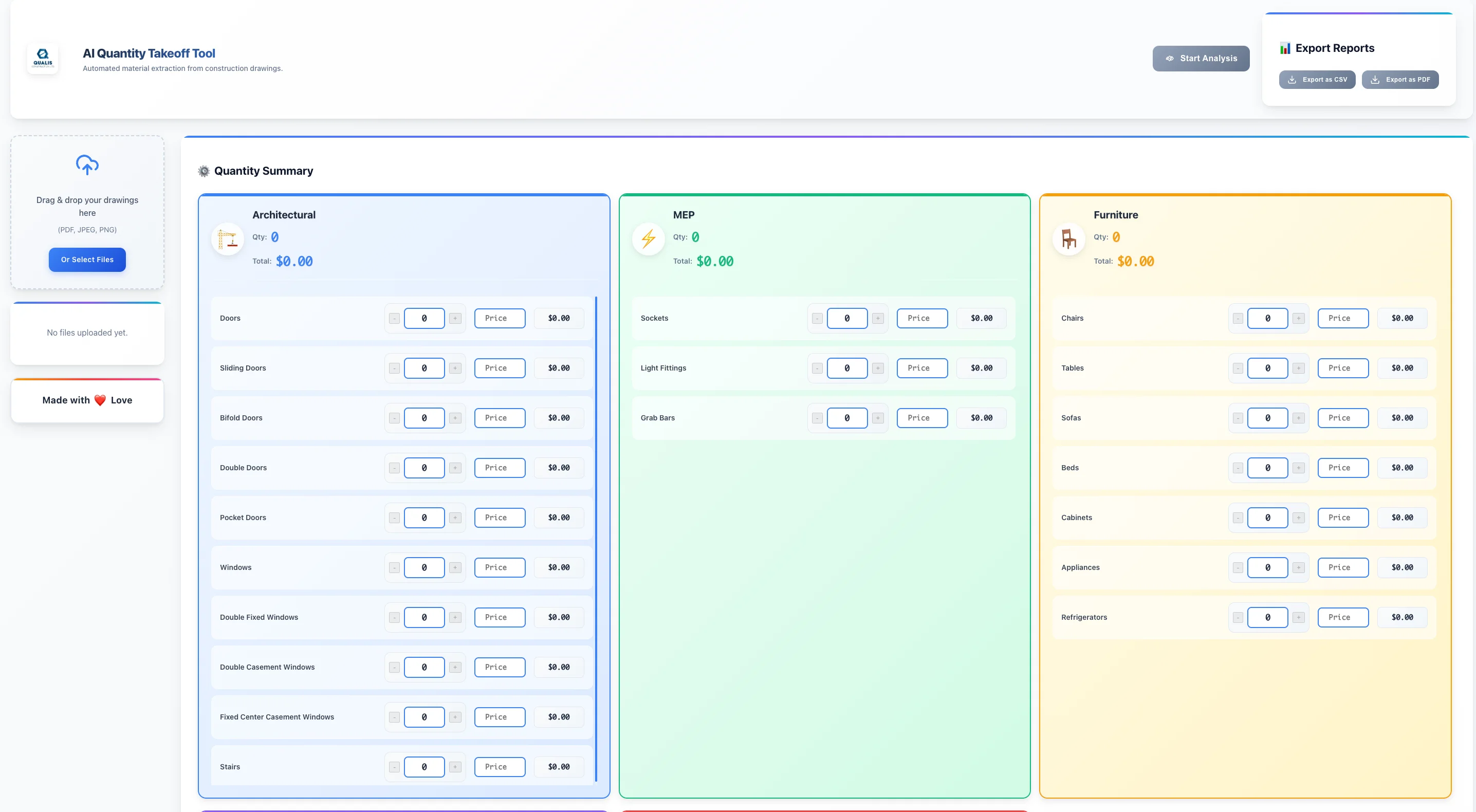
Build Interactive Review and Pricing Controls
Give estimators the ability to view detection overlays on their drawings, manually adjust quantities where needed, and enter unit prices against each detected category for immediate cost calculation.
Export Professional Cost Estimation Reports
Generate structured output reports in CSV and PDF formats that estimators can use directly in downstream project cost documentation and client-facing bid submissions.
Turning Raw Blueprint Files into Intelligent Quantity and Cost Estimates
Akoode built a cross-platform desktop application combining an Electron and React frontend with a local Python Flask AI backend. Estimators upload blueprint files, the system slices and analyses them using YOLOv8 object detection, and delivers a categorised quantity summary with interactive review controls and exportable cost reports, all processed locally with no external data transfer at any stage.
File Upload
Estimators drag and drop PDF or image blueprint files directly into the application. Multi-page PDFs are converted to high-fidelity images using Poppler before processing begins, with no file size restriction imposed on the user.
Smart Slicing
Large, high-resolution blueprints are intelligently divided into overlapping tiles using SAHI. Each tile is sized for optimal AI detection accuracy, allowing the model to identify small architectural elements that would be missed in a full-page analysis.
AI Detection
YOLOv8 runs inference across every tile, detecting and classifying elements across five categories: architectural, MEP, furniture, fixtures and fittings, and hardware. ONNX Runtime optimises inference speed for standard office laptops without requiring a dedicated GPU.
Results Merge and Review
Detection results from all tiles are merged using Non-Maximum Suppression to eliminate duplicate detections at tile boundaries. Estimators view bounding box overlays on the original drawing and adjust counts manually where needed.
Cost Calculation and Export
Confirmed quantities are mapped to unit prices entered by the estimator. The system calculates line-item and category totals, displays a project summary, and exports the final cost estimate to CSV or PDF for downstream use.
What Makes This System Powerful
Highlight 01
YOLOv8 Object Detection for Automated Architectural Element Classification
The application uses YOLOv8, a state-of-the-art object detection model, to automatically identify and classify architectural elements across five categories from uploaded blueprint drawings. Detection runs entirely on the local machine through ONNX Runtime, making AI-powered estimation accessible on standard office hardware without cloud access or GPU requirements.
- Five element categories detected and classified automatically
- Runs on standard office laptops via ONNX Runtime CPU inference
- Zero cloud API calls at any stage of the detection process
Highlight 02
SAHI-Based Smart Slicing for High-Resolution Blueprint Processing
Large engineering drawings are processed using Slicing Aided Hyper Inference, which divides each page into overlapping tiles before running detection. This approach allows the model to identify small fixtures and components in massive, high-resolution files that would cause accuracy degradation in a standard full-image detection pass.
- Overlapping tile slicing preserves detection accuracy at file edges
- Non-Maximum Suppression merges results and removes duplicate detections
- Handles multi-page PDFs of any resolution without manual pre-processing
Highlight 03
Fully Offline Architecture With Hardware-Locked Activation
All AI processing, file handling, and data storage happens on the user's local machine. No drawing data is transmitted to external servers at any point. The application includes a secure offline activation system that validates the licence against the machine's unique hardware ID, preventing unauthorised use without requiring any internet connection for normal operation.
- Complete data isolation with no external network calls during use
- Hardware-locked licence validation runs fully offline
- Suitable for sensitive, high-security, and government-adjacent projects
Highlight 04
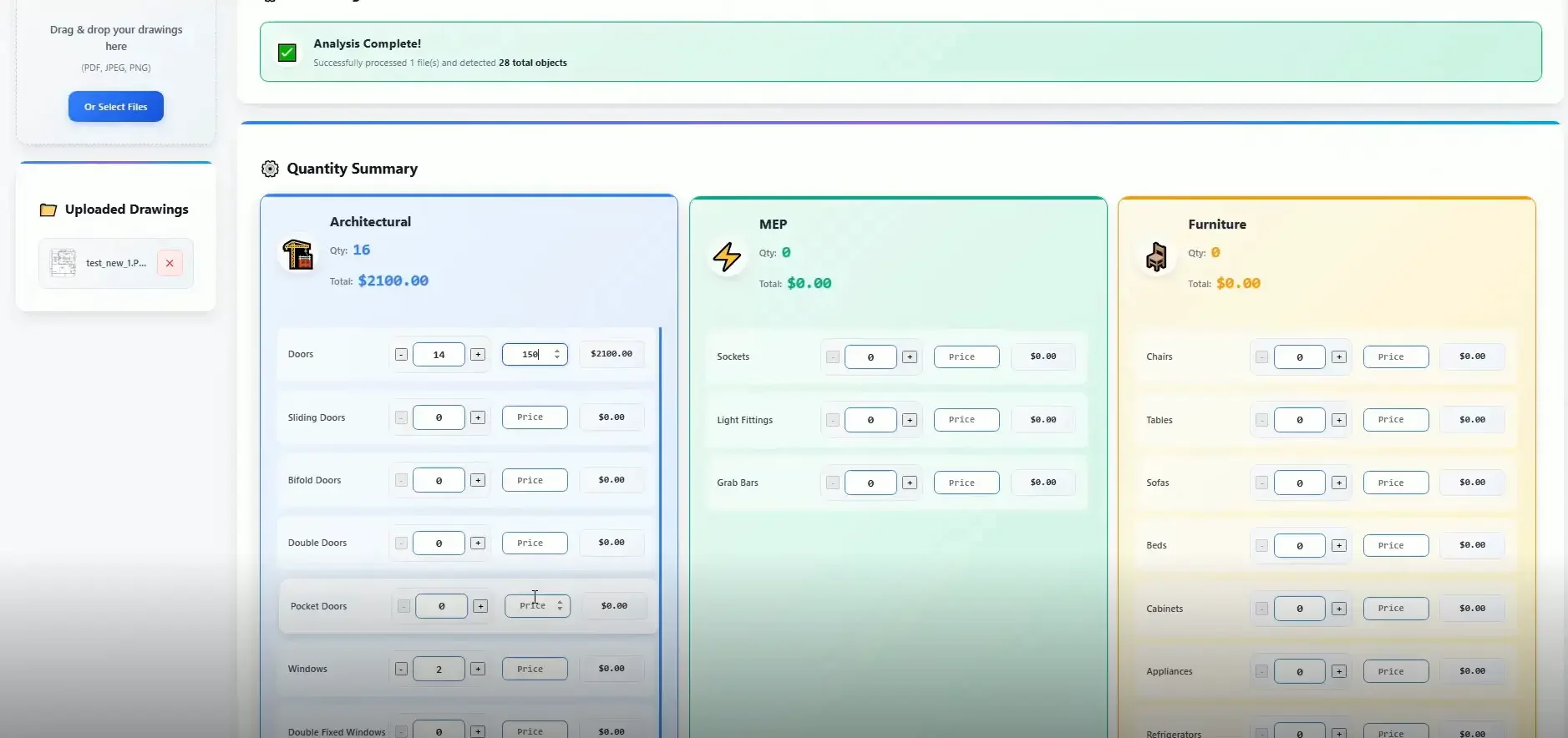
Interactive Detection Review With Manual Count Adjustment
After detection completes, estimators view bounding box overlays drawn directly onto the blueprint using React-Konva. Any detected element can be confirmed, adjusted, or corrected manually before the count is finalised. This review layer ensures that AI-generated counts are verified by the estimator before they flow into cost calculations.
- Visual bounding box overlays on original drawing view
- Manual count adjustment controls for each element category
- Quantity confirmation step before cost calculation begins
Highlight 05
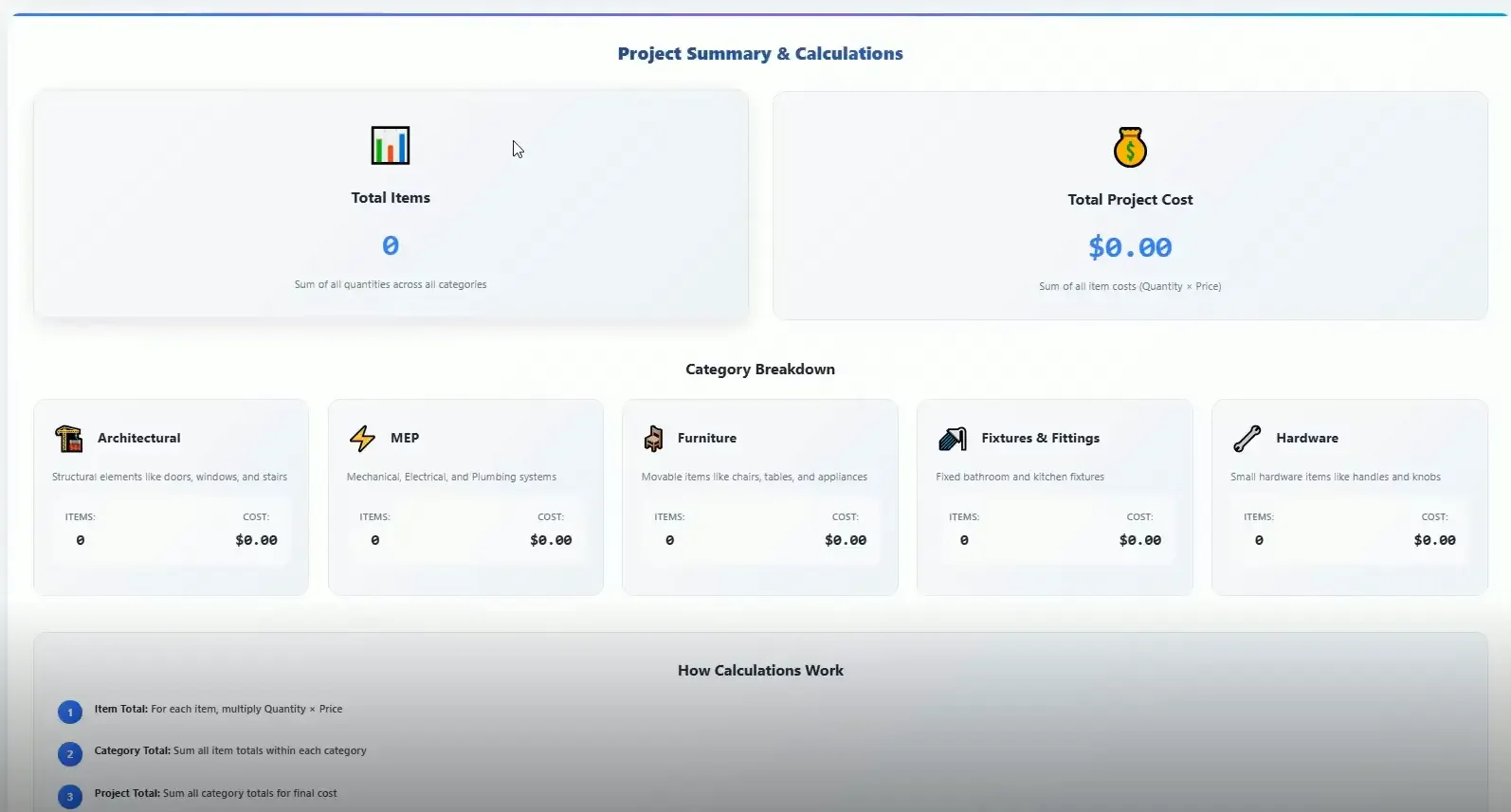
Automated Cost Calculation and Professional Report Export
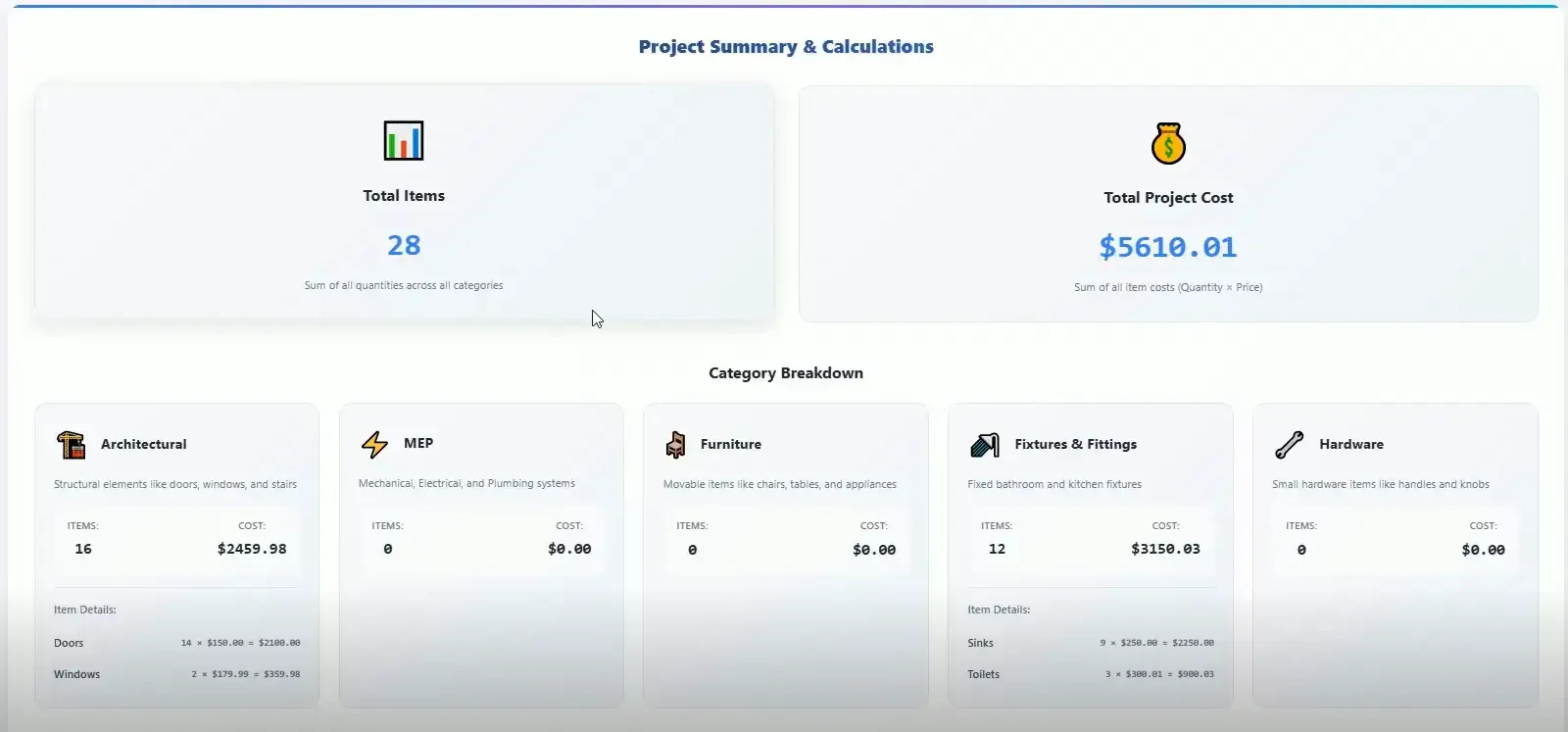
Confirmed element quantities are multiplied by estimator-entered unit prices across all five categories. The system produces a project summary showing total items, category breakdowns, and total project cost, then exports the complete estimate to CSV for spreadsheet workflows or PDF for client-facing documentation.
- Line-item and category cost calculations generated automatically
- Project summary dashboard with total items and total cost display
- Export to CSV and PDF for downstream estimation and reporting use
Key Challenges in Building an Offline AI Quantity Takeoff Desktop Application
Building a production-ready AI detection system that runs entirely on local hardware, handles massive blueprint files accurately, and ships as a single cross-platform installer required solving problems that no off-the-shelf combination of tools addressed directly. Each challenge required purpose-built solutions at the architecture level rather than configuration adjustments to existing frameworks.

Processing Large Blueprints Without Losing Detection Accuracy
Standard object detection models degrade significantly when applied to full high-resolution blueprint pages, missing small elements that matter to an estimator.
Our Approach
SAHI was integrated to slice each page into overlapping tiles before detection, with Non-Maximum Suppression merging results and eliminating duplicates at tile boundaries.
Running AI Inference on Standard Office Hardware Without a GPU
Construction estimators work on standard office laptops, not GPU-equipped workstations. The detection pipeline had to deliver usable performance without dedicated graphics hardware.
Our Approach
ONNX Runtime was implemented for CPU-optimised inference, converting the YOLOv8 model to a format that runs at acceptable speed on standard laptop processors without GPU dependency.
Bundling a Full Python AI Environment Into a Single Installer
Users cannot be expected to install Python, configure environments, or manage dependencies. The entire backend had to be invisible to the end user.
Our Approach
A standalone Python environment was embedded within the Electron Builder installer, spawning the local Flask server automatically on application startup with no user-facing setup required.
Securing the Application Against Unauthorised Use Without Internet
Standard licence validation relies on cloud verification. The offline requirement meant a different approach to preventing piracy without compromising the no-network-call guarantee.
Our Approach
An offline activation system was built that validates a licence key against the machine's unique hardware signature, binding each installation to a specific device without any external server communication.
What Changed After Implementation
Before this application existed, the client's estimators counted every door, window, fixture, and electrical element on every blueprint page by hand. A single project set could take hours of focused review, with accuracy depending entirely on individual concentration and the absence of fatigue. After deployment, the same estimator uploads their drawings, reviews AI-generated detections, adjusts where needed, enters unit prices, and exports a complete professional cost report in a fraction of the time. The 80% reduction in time per page is not a projection. It is the measured difference between the manual process and the automated one.
Hours Spent Counting Per Blueprint Set
Estimators manually reviewed every page, counting each element category by hand across large, dense architectural drawings.
Error Rate Tied to Individual Concentration
Missed items and double counts were a function of fatigue, with accuracy declining through long estimation sessions.
No Feasible AI Option Due to Data Privacy Rules
Cloud-based detection tools were not an option for a firm handling proprietary engineering drawings for sensitive projects.
No Structured Cost Output From the Counting Process
Manual counts fed into separate spreadsheet workflows with no integrated pricing, calculation, or report generation.
YOLOv8 Automated Detection Across Five Categories
AI detection identifies and classifies all architectural elements automatically, replacing the manual counting step entirely for standard blueprint types.
SAHI Slicing for Consistent Accuracy at Scale
Blueprint pages are sliced into overlapping tiles before detection, ensuring small elements are identified accurately regardless of file resolution or page density.
Fully Offline Local Processing Architecture
All inference runs on the user's machine with no external data transfer, meeting data privacy requirements for sensitive and high-security project work.
Integrated Pricing, Calculation, and Report Export
Quantities flow directly into a cost calculation interface with CSV and PDF export, replacing the manual handoff to separate spreadsheet tools.
80% Reduction in Time Per Page
Quantity takeoff that previously consumed hours now completes in minutes, freeing estimators for higher-value project work.
Systematic Detection Reduces Missed Items
AI scanning covers every area of every page with consistent attention, eliminating the fatigue-driven errors that affected manual review.
Complete Data Privacy With Zero Cloud Exposure
Every engineering drawing stays on the client's own hardware throughout the entire estimation process.
Professional Cost Reports Generated in One Workflow
From file upload to exportable PDF cost estimate, the entire process runs within a single application without external tools.
80%Time Reduction Per Page
Estimation time per blueprint page reduced from hours to minutes through automated AI detection.
ZeroCloud Dependency
Every drawing processed locally with no external data transfer at any stage of the workflow.
5Detection Categories Live
Architectural, MEP, furniture, fixtures and fittings, and hardware all detected and classified automatically.
Use Cases of AI Computer Vision in Construction Estimation and Blueprint Analysis
The offline AI detection architecture, smart slicing pipeline, and structured output system built for this platform applies beyond quantity takeoff for a single firm. The same core approach works for any organisation that needs accurate automated analysis of large-format technical drawings under data privacy constraints, across construction, engineering, real estate development, and facilities management.
Construction Quantity Takeoff Automation
Estimation teams counting materials, fixtures, and architectural elements from blueprint sets for project bid preparation and cost modelling.
MEP System Detection
From engineering drawings, mechanical, electrical, and plumbing engineers extracting component counts from service drawings for installation planning and procurement.
Real Estate Development Cost Estimation
Property developers estimating fixture and finish quantities across multiple unit types from architectural plans before procurement and contractor engagement.
Facilities Management Asset Counting
Facilities teams auditing installed assets, fixtures, and equipment across building floor plans using AI detection rather than physical walkthroughs.
Government and Defence Secure Blueprint Analysis
Organisations working with classified or sensitive engineering drawings that require AI-assisted analysis without any data leaving their controlled environment.
Architectural Review for Interior Fit-Out Projects
Interior contractors counting doors, furniture items, and fixtures from design drawings to generate accurate material procurement and labour estimates.
Why Businesses Choose Akoode Technologies for Artificial Intelligence Development
Akoode builds AI systems for organisations where accuracy, data security, and production-readiness are requirements, not aspirations. The team works across the full build scope from model training and inference optimisation through application development and deployment. Projects range from offline desktop AI tools for construction and estimation to computer vision systems for industrial, healthcare, and enterprise environments.
Domain-Specific AI Model Training, Not Generic Adaptation
The detection models in this platform were trained and validated against real architectural drawings, not adapted from generic object detection benchmarks. That distinction matters when the system is counting elements that determine project bid values.
End-to-End Ownership From Model to Deployed Application
Akoode handled the full build, from YOLOv8 model development and SAHI integration through the Electron desktop application, local Flask backend, and installer packaging. The client received a production-ready product, not a model that needed another team to ship.
Offline-First Architecture for Data-Sensitive Environments
When a project brief requires zero cloud dependency, Akoode builds that constraint into the architecture from the first design decision rather than adding it as a layer over a cloud-native system. This platform has no external network calls by design, not by accident.
Production-Ready AI That Non-Technical Users Can Operate
The gap between an accurate AI model and a tool that an estimator can open and trust without a learning curve is significant. Akoode closed that gap by building the full user-facing application around the detection pipeline, not presenting the model as the finished product.