


 August 21, 2026
Most businesses that come to us wanting an "AI app" don't actually start with a technical question. They start with an operational one: support tickets are piling up, sales reps are spending hours on manual research, or a competitor just launched something that makes their product feel dated. AI is the tool, not the goal.
That distinction matters because it changes how you plan the build. An AI-powered customer support tool, a document-processing system for a law firm, and a computer-vision app for a warehouse are all "AI apps," but they have almost nothing in common in terms of architecture, cost, or timeline.
Building an AI application is no longer something only large tech companies can afford to do. APIs from providers like OpenAI, Anthropic, and Google have removed the need to train a model from scratch for most AI development use cases. But that doesn't mean AI apps are simple or cheap — the real cost and complexity come from integrations, data handling, security, and the amount of custom engineering wrapped around the AI layer.
This guide walks through what an AI app actually is, how one gets built step by step, what it costs, how long it takes, and how to avoid the mistakes that derail most first-time AI projects.
Quick answer: Building an AI app means defining a specific business problem, choosing the right AI approach (an LLM API, a fine-tuned model, RAG, or a computer vision model), designing an architecture that connects your app to that AI layer, building an MVP, and testing it for accuracy and reliability before scaling. Most teams start with an existing AI API rather than training a model from the ground up.
What Is an AI App?
An AI app is any application where a machine learning model — not just hardcoded rules — makes a meaningful part of the decision, prediction, or content generation happening inside the product. That's a broad definition on purpose, because "AI app" today covers a wide range of very different tools.
Some common categories:
AI chat applications — customer-facing or internal assistants that answer questions in natural language
AI customer support — tools that triage tickets, draft responses, or resolve simple queries without a human
AI recommendation engines — product, content, or service suggestions based on user behavior
AI document processing — extracting, summarizing, or classifying information from contracts, invoices, or forms
AI image recognition — identifying objects, defects, or patterns in photos or video, powered by computer vision
AI voice applications — transcription, voice assistants, or voice-driven workflows
AI productivity tools — drafting, summarizing, or automating repetitive knowledge work
AI sales and marketing applications — lead scoring, personalized outreach, content generation
AI healthcare applications — clinical documentation support, intake automation, diagnostic assistance
AI finance applications — fraud detection, risk scoring, automated reporting
None of these require reinventing machine learning. Most are built on top of existing models, wired into an application that handles the actual business logic, data, and user experience around them.
How to Build an AI App
The build process is fairly consistent across use cases, even though the AI layer itself varies a lot. Here's the sequence that tends to hold up in practice.
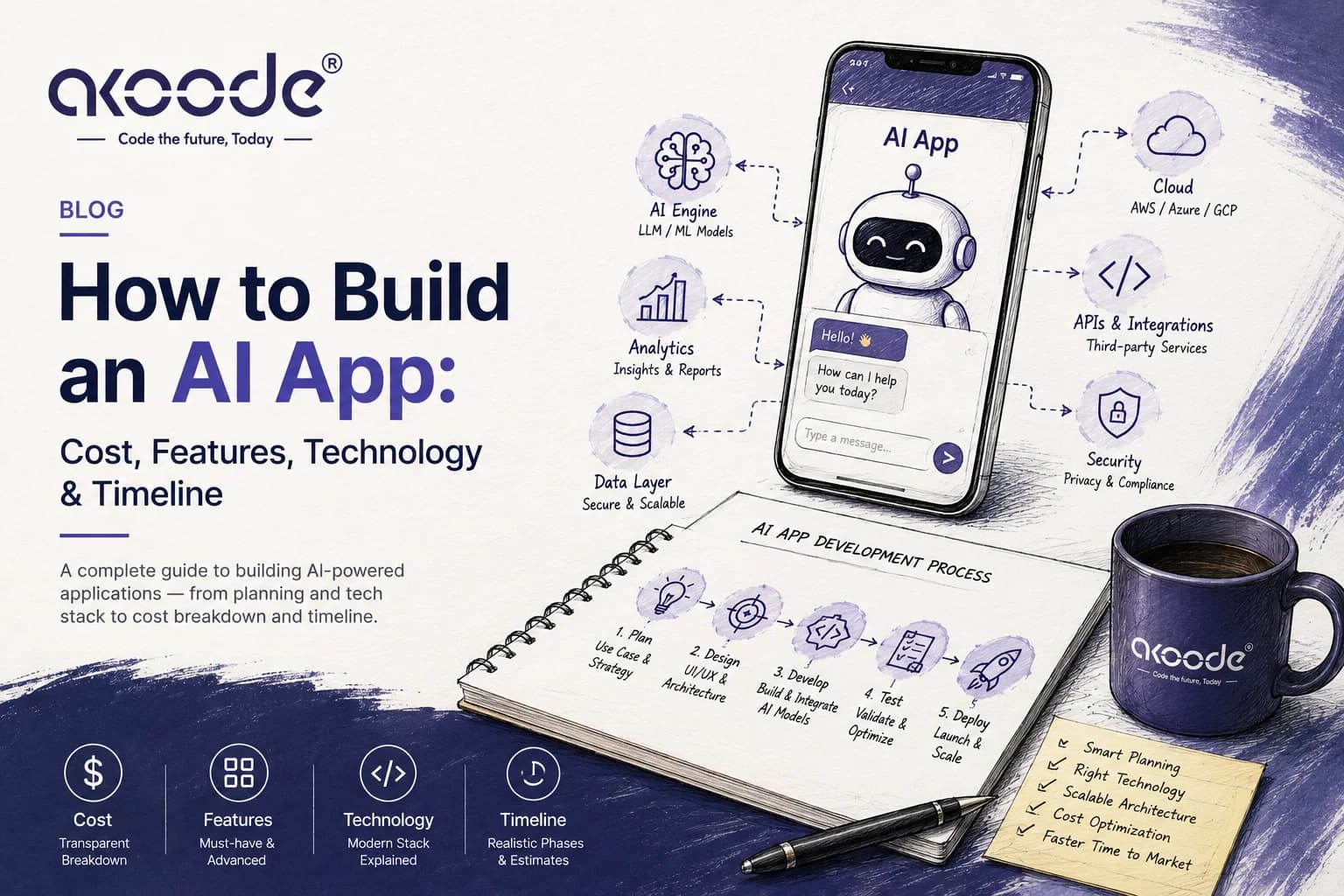
1. Define the Problem and AI Use Case
Start with what's actually broken or slow, not with "we should have AI." Teams that begin by asking "where should we add AI" almost always end up with a feature nobody uses. Teams that begin with "support response time is too slow" or "our sales reps can't keep up with lead volume" end up with something people actually adopt, because the AI is solving a problem someone already feels.
2. Define Users and Core Features
Once the problem is clear, map out who uses the app and what the smallest useful version looks like. This is standard product planning, but it matters more with AI because it's tempting to over-scope — trying to automate an entire workflow instead of the one step that's actually painful.
3. Choose the Right AI Approach
This is where most of the technical decision-making happens. A few common approaches:
LLM APIs — using a hosted model (like GPT or Claude) through an API for text generation, summarization, or conversation
Generative AI — producing new content: text, images, code, or structured data
Machine learning — traditional predictive models for classification, scoring, or forecasting
RAG (retrieval-augmented generation) — connecting an LLM to your own documents or database so it answers using your data instead of just its training data
Fine-tuning — adjusting a model on your own examples when you need very specific behavior or tone
Computer vision — models that interpret images or video
Speech AI — transcription and voice interfaces
Recommendation systems — models trained on behavioral data to rank or suggest items, usually built on top of a broader data science pipeline
AI agents — systems that can take multi-step actions, not just respond to a single prompt (this typically falls under generative AI integration work)
Most business applications today lean on LLM APIs combined with RAG, because it's faster to ship and doesn't require you to own model training infrastructure. Fine-tuning and custom ML models still make sense when you have a narrow, high-volume task and enough proprietary data to train on.
4. Design the Application Architecture
A typical AI app architecture looks like: frontend → backend → AI layer → database → external APIs → cloud infrastructure. The frontend handles the user interface, the backend manages business logic and orchestrates requests, the AI layer (an API call, a RAG pipeline, or a hosted model) handles the intelligence, and the database stores everything from user data to the documents your RAG system retrieves from. Cloud infrastructure ties it together and handles scaling.
The part people underestimate is the "orchestration" layer between the backend and the AI model — the code that formats prompts, retrieves the right context, handles retries, and manages what happens when the model gives a bad or incomplete answer. That layer is usually where the real engineering effort goes, not the AI call itself.
5. Select AI Models and APIs
Common options include OpenAI, Anthropic, Google Gemini, and open-source models available through platforms like Hugging Face. There's no universally "best" model — the right choice depends on accuracy needs, latency tolerance, cost per request, data privacy requirements, and how much context the model needs to handle. A customer support chatbot has very different requirements than a document-analysis tool processing thousands of pages a day. It's worth testing more than one model against your actual use case before committing, since benchmarks rarely reflect how a model performs on your specific data.
6. Develop the MVP
Build the smallest version that solves the core problem, not every feature on the roadmap. This is the same MVP development approach that applies to any software project, but it's especially important with AI because you learn things about model behavior — where it's accurate, where it hallucinates, what users actually ask — only once real usage starts. Locking in a large feature set before that feedback exists tends to waste both time and budget.
7. Integrate AI Into the Application
This is where the AI layer gets connected to everything else: authentication, your database, third-party APIs, and any business systems the app needs to talk to (a CRM, a ticketing system, an ERP). RAG implementations also happen here, connecting the model to your documents through a vector database and a retrieval pipeline — this stage tends to overlap heavily with broader custom software development work, since most of the integration logic lives outside the AI model itself.
8. Test AI Performance
AI testing looks different from traditional QA. Beyond functional bugs, you're testing for accuracy, hallucination rates, latency, and how the system behaves on edge cases and adversarial inputs. Prompt testing — running the same query multiple ways to check consistency — and structured user acceptance testing both matter here, because AI output isn't deterministic the way traditional software logic is.
9. Deploy and Monitor
After launch, the work isn't done. Production AI systems need logging (to see what users are actually asking and where the model struggles), cost monitoring (API usage can scale unpredictably), performance monitoring, and a process for continuous improvement as you learn from real usage.
Essential Features of an AI App
Feature | Purpose | Example |
|---|---|---|
AI chatbot | Natural-language interaction with users | Support assistant answering account questions |
User authentication | Secure access and personalization | Login, SSO, role-based access |
Personalization | Tailoring content or results to the user | Personalized dashboards or recommendations |
AI search | Semantic search beyond keyword matching | "Find contracts expiring this quarter" |
Recommendations | Suggesting relevant items or actions | Product or content recommendations |
Document upload | Letting users feed data into the AI layer | Uploading invoices for automated processing |
Voice interaction | Speech-based input or output | Voice-driven data entry |
Image processing | Interpreting visual input | Defect detection in manufacturing photos |
Notifications | Alerting users to AI-driven events | Fraud alert, anomaly detected |
Analytics dashboard | Surfacing usage and performance data | Query volume, resolution rate |
Admin dashboard | Managing content, users, and AI behavior | Reviewing flagged AI responses |
API integrations | Connecting to existing business systems | CRM, ERP, payment processor |
Payment integration | Handling transactions where relevant | Subscription billing |
Human handoff | Escalating from AI to a human | Support ticket escalation |
AI agent / workflow automation | Multi-step automated actions | Auto-drafting and routing approvals |
For an MVP, focus on the core AI interaction (chatbot, search, or document processing), basic authentication, and a simple admin view. Personalization, voice, agents, and advanced analytics are usually second-phase additions once the core loop is validated.
Technologies Used to Build an AI App
The right stack depends on the application — there's no single "correct" combination. That said, here's what's commonly used across each layer.
Layer | Common Technologies |
|---|---|
Frontend | React, Next.js, Flutter, React Native |
Backend | Node.js, Python, Laravel/PHP (where appropriate) |
AI / ML | OpenAI APIs, Anthropic, Google Gemini, Hugging Face, LangChain/LangGraph, Python ML frameworks |
Databases | PostgreSQL, MySQL, MongoDB, vector databases (for RAG and semantic search) |
Cloud | AWS, Google Cloud, Microsoft Azure (cloud & DevOps setup) |
Python remains the default choice when the backend needs to do heavier ML work directly, while Node.js is common when the app is mostly orchestrating API calls to hosted models. Vector databases only become necessary once you're doing RAG or semantic search — a standard SQL database is fine for apps that are just calling an LLM API without retrieving from a custom knowledge base.
How Much Does It Cost to Build an AI App?
Costs vary widely based on scope, and anyone quoting a single number without knowing your requirements is guessing. That said, here are indicative ranges based on the kind of AI application being built.
AI App Type | Estimated Cost | Typical Timeline |
|---|---|---|
Simple AI MVP | $10,000–$25,000 | 4–8 weeks |
AI-powered business application | $25,000–$60,000 | 8–14 weeks |
Advanced AI application | $60,000–$120,000+ | 3–6 months |
Enterprise AI platform | $120,000+ | 6+ months |
These are indicative ranges, not fixed quotes — actual cost depends on your specific requirements.
What drives cost up or down:
Number and complexity of features
UI/UX complexity
AI model or API usage volume
Whether RAG needs to be implemented
Fine-tuning requirements
Whether the app includes AI agents (multi-step automation)
Number and complexity of third-party integrations
Whether a mobile app is included alongside web
Security and compliance requirements (HIPAA, SOC 2, etc.)
Cloud infrastructure needs
Data migration from legacy systems
Testing depth
Ongoing maintenance scope
One distinction that trips people up: development cost and ongoing AI/API/cloud cost are separate line items. The build is a one-time (or milestone-based) investment. Running the app afterward means paying for model API calls, cloud hosting, and vector database storage on an ongoing basis — and those costs scale with usage, not with how much you spent to build the app. A chatbot that gets 500 queries a day costs very little to run; the same chatbot at 500,000 queries a day is a different budget conversation. It's worth modeling expected usage before launch so the ongoing cost isn't a surprise.
How Long Does It Take to Build an AI App?
Discovery & planning: 1–2 weeks
UI/UX design: 1–3 weeks
MVP development: 4–8 weeks
AI integration & testing: 2–4 weeks
Production deployment: 1–2 weeks
These stages often overlap — design can continue while backend development starts, and AI integration testing frequently runs in parallel with the later stages of MVP development. A simple AI wrapper around an existing API can go from kickoff to launch in a matter of weeks. An enterprise AI platform with multiple integrations, custom data pipelines, and compliance requirements can reasonably take several months, and that's usually the right call rather than a sign of inefficiency — rushing security or data architecture on a large platform tends to cost more later.
Factors That Affect AI App Development Cost
AI complexity — a single API call is very different from a multi-model RAG pipeline
Number of features — each additional feature adds design, development, and testing time
Model selection — some models cost significantly more per request than others
Data requirements — how much data needs to be cleaned, structured, or migrated
RAG or fine-tuning — both add meaningful engineering time over a simple API integration
Integrations — every third-party system you connect to adds scope
Platform requirements — web only vs. web and mobile vs. multiple mobile platforms
Security and compliance — regulated industries (healthcare, finance) require more upfront work
Scalability needs — building for 100 users vs. 100,000 users changes architecture decisions
Development team location and expertise — rates and delivery models vary significantly by region and by how specialized the AI engineering work is; some teams also bring in staff augmentation to add AI specialists to an existing in-house team rather than outsourcing the whole build
Should You Build an AI App From Scratch or Add AI to an Existing App?
Both are valid paths, and the right one depends on what you already have.
Building a new AI application makes sense when the AI capability is the product — a purpose-built tool where the AI interaction is the primary user experience, or when your existing systems are too outdated or fragmented to extend cleanly.
Adding AI to an existing app makes sense far more often than founders expect. If you already have a working product with real users, bolting on an AI feature — a smarter search, an assistant, automated document handling, or an AI-powered upgrade to an existing website — is usually faster and lower-risk than starting over. You keep your existing user base, data, and infrastructure, and you're only adding the AI layer on top.
A practical rule of thumb: if the AI is meant to enhance something people already do in your product, extend the existing app. If the AI itself is the entire reason the product exists, a new build is usually cleaner.
Common Mistakes When Building an AI App
Building AI without a clear use case — adding a chatbot because competitors have one, not because it solves anything
Trying to build too many features initially — scope creep is worse with AI because it's easy to imagine ambitious automations before validating the basics
Choosing models based only on popularity — the most talked-about model isn't automatically the best fit for your latency, cost, or accuracy needs
Ignoring AI inference costs — teams that don't model usage costs early get surprised by the bill once real traffic arrives
Not testing hallucinations — shipping without adversarial testing means users find the failure cases for you, in production
Poor data quality — a RAG system is only as good as the documents it retrieves from; messy source data produces messy answers
Ignoring security — AI features often touch sensitive data and need the same security rigor as the rest of the app, sometimes more
No monitoring after launch — without logging and monitoring, you have no visibility into what's actually failing
Underestimating UX — a technically accurate AI feature with a confusing interface still won't get adopted
Treating AI as a one-time implementation — models, prompts, and retrieval quality need ongoing tuning as usage patterns evolve
Building an AI App from the US, UK, or Canada
Where you're based mostly affects how you engage a development partner rather than what gets built — the process, tech stack, and cost drivers above hold regardless of market. A few practical differences worth knowing if you're comparing markets:
US businesses tend to move fastest on AI adoption but also carry the widest range of state-level compliance considerations (data privacy laws vary by state), which affects how much security work goes into the estimate. See our software development services for the US.
UK businesses generally need to account for UK GDPR from day one, particularly for anything handling customer data through RAG or personalization. See our software development services for the UK.
Canadian businesses sit under PIPEDA, and bilingual (English/French) requirements sometimes affect scope for customer-facing AI features. See our software development services for Canada.
In practice, the AI engineering work is nearly identical across all three — the differences show up in compliance scoping and, sometimes, in typical budget expectations by market.
Real-World Example: Building an AI-Powered Real Estate App
A practical example of this approach is BigCat Realty, a premium real estate consultancy in Gurugram. Akoode built an AI-powered property advisory platform that combines property discovery with an integrated AI advisor, BigCatGPT.
Instead of functioning as another property-listing website, the platform allows buyers to ask natural-language questions about property prices, locations, and investment opportunities and receive contextual answers. The platform was built with Next.js, a custom REST API backend, AI integration, WhatsApp-based lead capture, advanced property filtering, an SEO content engine, and a central admin dashboard.
Read the full BigCat Realty case study →
How to Choose an AI App Development Company
A few things worth evaluating before you commit to a partner:
AI engineering experience — not just general software development, but hands-on work with LLM integration, RAG, and production AI systems
Relevant case studies — evidence they've shipped something comparable to what you're building
Full-stack development capability — the AI layer is a small part of the app; you need a team that can build the whole product around it
Cloud expertise — AI apps live and die on infrastructure decisions made early
Security practices — especially important if you're handling regulated or sensitive data
Ability to build MVPs — a partner that pushes you toward a lean first version, not a six-month scope before you've validated anything
Post-launch support — AI systems need tuning after launch, not just a handoff
Communication — how responsive and transparent they are during the build
Transparency around pricing — clear milestones and scope, not vague estimates
Ability to scale the product — can they support you if usage grows well beyond the MVP
Akoode Technologies works across AI, custom software, and mobile app development for startups and enterprises building AI-powered products, with a full-stack team that handles both the AI layer and everything around it. If you're weighing your options, it's worth including a team that can speak to both the AI engineering and the broader product architecture in the same conversation.
Frequently Asked Questions
How much does it cost to build an AI app? Costs typically range from $10,000 for a simple MVP to $120,000+ for an enterprise platform, depending on features, integrations, and compliance requirements. Get a scoped estimate based on your specific use case rather than relying on a general range.
How long does it take to build an AI app? A simple AI MVP can take 4–8 weeks, while an enterprise-grade platform can take 6 months or more, depending on integration complexity and compliance needs.
Can I build an AI app without training my own AI model? Yes. Most AI apps today use existing model APIs (OpenAI, Anthropic, Google Gemini) rather than training a model from scratch, which significantly reduces cost and time to launch.
What technology is best for AI app development? There's no single best stack — it depends on your use case. React/Next.js for web frontends, Node.js or Python for backends, and an LLM API paired with a vector database for RAG are common combinations.
Can ChatGPT API be used to build an AI app? Yes, OpenAI's API (and comparable APIs from other providers) is a common foundation for AI apps, particularly for chat, content generation, and summarization features.
How much does it cost to run an AI app? Ongoing costs depend on usage volume — API calls, cloud hosting, and vector database storage all scale with traffic. This is separate from the one-time development cost and should be modeled based on expected usage.
Can an existing app be converted into an AI-powered app? Yes, adding AI features to an existing product is often faster and lower-risk than building a new app from scratch, since you keep your existing users, data, and infrastructure.
Is RAG necessary for an AI app? Only if the app needs to answer using your own data or documents rather than general knowledge. A simple chatbot without a custom knowledge base doesn't need RAG.
How do I choose an AI model for my application? Base the decision on accuracy for your specific task, latency requirements, cost per request, data privacy needs, and how much context the model needs to handle — test more than one model against your actual data before committing.
Can an AI development company build an MVP first? Yes, and it's generally the better approach — an MVP validates the use case and surfaces real usage patterns before you invest in the full feature set.
Final Thoughts
Building a successful AI app isn't really about picking the "right" model. The model is often the easiest decision in the whole process. What actually determines whether an AI app succeeds is the product strategy behind it, the architecture connecting it to your data and systems, how well it's tested against real-world edge cases, and whether someone keeps tuning it after launch based on how people actually use it.
If you're thinking through an AI application — a new build or adding AI to something you've already got — it's worth talking through the specifics of your use case, data, and existing systems before scoping anything. Book a time to talk it through.
Get In Touch Now
View More Our Blog