


 May 19, 2026
The question every engineering team faces is not whether to automate the pipeline. That debate is over. Automation is the standard.
The real question is which tool to build that pipeline on.
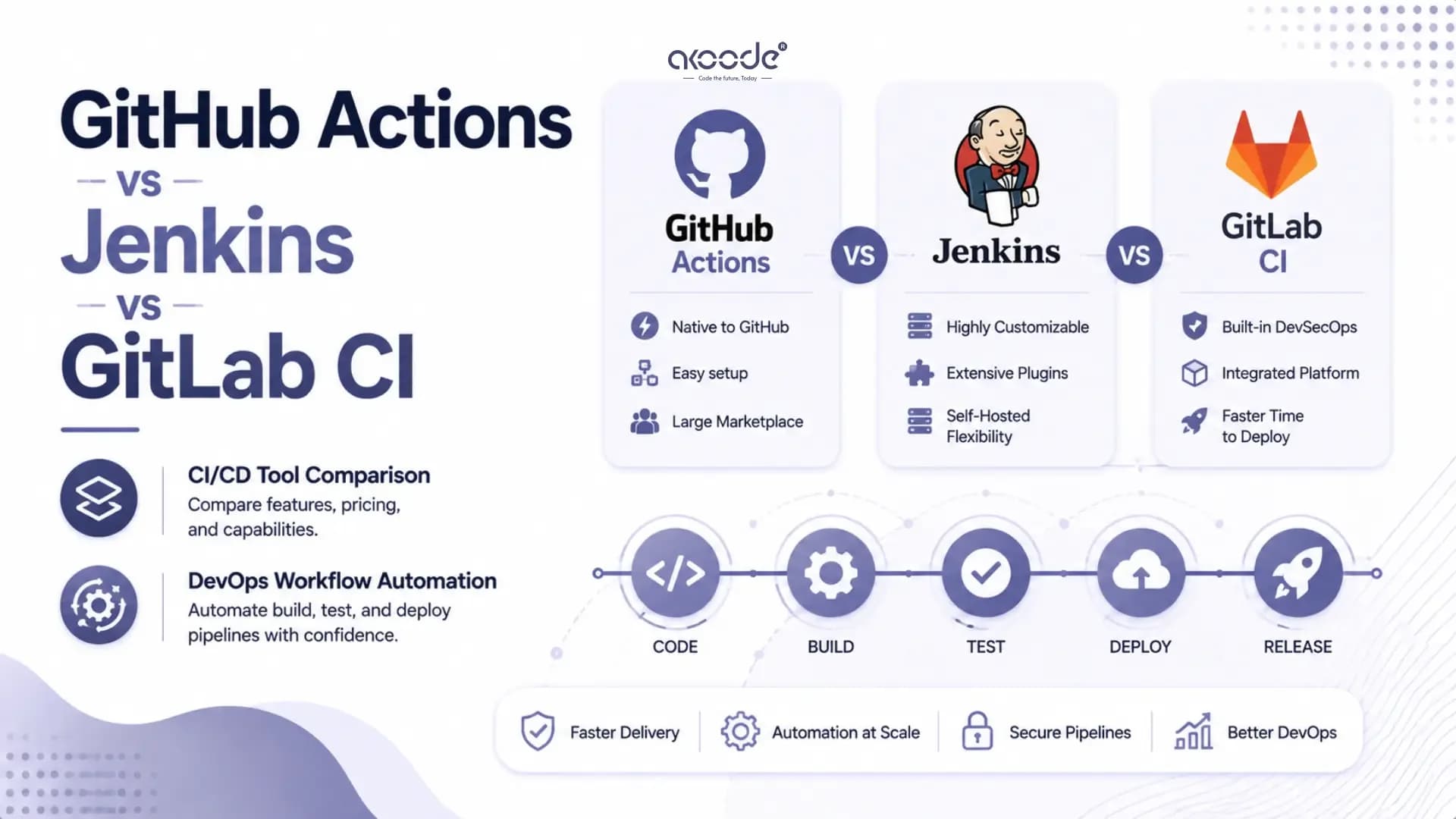
GitHub Actions, Jenkins, and GitLab CI are the three dominant choices in 2026. Each has a different philosophy, a different maintenance model, and a different sweet spot. Choosing the wrong one does not just slow down deployments. It adds engineering overhead that compounds across every sprint, every release, and every new developer who joins the team.
This guide breaks down each tool clearly so your team can make the right call.
What Is the Core Difference Between GitHub Actions, Jenkins, and GitLab CI?
Before comparing features and pricing, understanding what each tool is built around matters more.
GitHub Actions is a CI/CD platform built directly into GitHub. Pipelines live in the same repository as your code. They are triggered by GitHub events. Authentication is handled automatically. There is no separate server to configure or maintain.
Jenkins is an open-source automation server that has been the backbone of CI/CD pipelines since 2011. It runs on your own infrastructure. You control everything, server configuration, plugin selection, security policies, and scaling. That control comes with a significant maintenance cost.
GitLab CI is a CI/CD platform built into GitLab. Like GitHub Actions, it is native to the source code host. But GitLab goes further. It bundles code hosting, CI/CD, security scanning, container registry, and deployment tooling into a single platform. It is the most all-in-one option of the three.
The principle that governs the modern CI/CD market is platform gravity. The best pipeline tool is usually the one closest to where your code lives. That logic explains why GitHub Actions and GitLab CI have grown so fast. When the pipeline is embedded in the same system as the repository, setup friction drops to near zero.
How Does GitHub Actions Work?
GitHub Actions runs pipelines using workflow files written in YAML. These files live inside your repository under the .github/workflows directory. Every workflow is triggered by a GitHub event. A push to main, a pull request, a release tag, a scheduled time, or a manual trigger.
Workflows are made up of jobs. Jobs run on runners, which are virtual machines hosted by GitHub or self-hosted on your own servers. GitHub provides hosted runners on Ubuntu, Windows, and macOS. You define what each job does through a sequence of steps, each calling either a shell command or a reusable action from the GitHub Actions Marketplace.
The Marketplace contains over 20,000 reusable actions contributed by GitHub and the community. Deploying to AWS, running security scans, sending Slack notifications, publishing to npm. Most standard pipeline tasks already have published actions you can reference in three lines of YAML.
GitHub Actions is free for public repositories. For private repositories, GitHub provides 2,000 free minutes per month on the Free plan. Paid plans increase that limit significantly.
How Does Jenkins Work?
Jenkins uses a controller-agent architecture. The controller manages scheduling, configuration, and the web interface. Agents are the machines that actually run build jobs. You can run a single controller with one agent or scale to hundreds of distributed agents across different environments.
Pipelines in Jenkins are defined as Jenkinsfiles, written in Groovy. Groovy is a full programming language. This means Jenkins pipelines can contain loops, conditionals, shared libraries, and complex logic that YAML-based tools cannot express without workarounds.
Jenkins has over 1,800 community-built plugins. Integrations with virtually every tool in the DevOps ecosystem exist. Legacy source control systems, obscure build tools, specialised deployment targets. If it exists in software engineering, there is probably a Jenkins plugin for it.
The trade-off is maintenance. Running Jenkins means managing a server. That includes installing updates, managing plugin compatibility, configuring security, and handling the operational overhead of keeping the system healthy. For teams without a dedicated DevOps engineer, that overhead is a real cost.
Jenkins is free to download and run. Infrastructure costs depend on where you host it. A basic cloud VM for a small team runs $20 to $100 per month. Large enterprise deployments with many agents cost significantly more.
How Does GitLab CI Work?
GitLab CI pipelines are defined in a .gitlab-ci.yml file at the root of your repository. Like GitHub Actions, the syntax is YAML. Pipelines are triggered by events in the GitLab platform, pushes, merge requests, tags, and schedules.
GitLab CI runs jobs on runners. GitLab provides shared runners for cloud-hosted projects. You can also register your own self-hosted runners, which is important for teams that need to run pipelines inside a private network or on specific hardware.
What separates GitLab CI from the other two tools is how much it bundles. A GitLab instance includes source code management, CI/CD, a container registry, a package registry, built-in SAST and DAST security scanning, dependency scanning, code coverage reporting, Kubernetes deployment integration, and a feature flag system. All of this from a single platform with a single authentication model.
For enterprises that want a complete DevSecOps platform rather than a collection of integrated tools, GitLab is the most compelling option in 2026.
GitLab's free tier on GitLab.com includes 400 CI/CD minutes per month. Paid plans start at $29 per user per month for GitLab Premium and $99 per user per month for GitLab Ultimate, which includes the full security scanning suite.
GitHub Actions vs Jenkins vs GitLab CI: Side-by-Side Comparison
Factor | GitHub Actions | Jenkins | GitLab CI |
|---|---|---|---|
Setup time | Minutes | Hours to days | Minutes |
Configuration language | YAML | Groovy / Declarative | YAML |
Hosting model | Cloud-managed | Self-hosted | Cloud or self-hosted |
Maintenance overhead | Very low | High | Low to medium |
Plugin/integration ecosystem | 20,000+ Actions | 1,800+ plugins | Built-in suite |
Native SCM integration | GitHub only | Any VCS | GitLab only |
Security scanning | Third-party actions | Third-party plugins | Built-in SAST/DAST |
Kubernetes integration | Via actions | Via plugins | Native |
Free tier | 2,000 min/month (private) | Free (self-hosted costs) | 400 min/month |
Best for | GitHub teams, startups, open source | Enterprise, complex pipelines, air-gapped | All-in-one DevSecOps platform |
Vendor lock-in risk | Medium | Low | High |
Learning curve | Low | High | Low to medium |
What Is the Difference Between Jenkins and GitHub Actions in Practice?
The most direct comparison for most teams is Jenkins versus GitHub Actions. Here is where each wins clearly.
GitHub Actions wins on: setup speed, maintenance burden, developer experience, marketplace ecosystem, and cost for standard workloads. A developer who has never configured CI/CD can have a working GitHub Actions pipeline in under an hour. The same pipeline in Jenkins requires server setup, plugin installation, security configuration, and Jenkinsfile authoring before a single build runs.
Jenkins wins on: flexibility, infrastructure control, multi-SCM support, and air-gapped deployment. If your code lives across GitHub, GitLab, Bitbucket, and an internal SVN server simultaneously, Jenkins is the only tool that handles all of them cleanly. If your organisation operates in an air-gapped environment where nothing can reach external cloud services, Jenkins running on internal infrastructure is often the only viable option.
The maintenance cost of Jenkins is real and consistent. Engineering teams running Jenkins regularly spend several hours per week on plugin updates, compatibility issues, and server maintenance. That time is not spent building product. For teams that do not need Jenkins-level control, that overhead is difficult to justify.
GitHub Actions has eliminated most of the reasons to choose Jenkins for new projects. The teams still on Jenkins in 2026 are there either because their infrastructure requires it or because the migration cost of moving 200-plus existing pipelines is not yet worth the benefit.
What Is the Difference Between GitLab CI and Jenkins?
GitLab CI and Jenkins compete most directly in the enterprise market. The distinction is architectural philosophy.
Jenkins gives you a flexible automation server you can point at anything. It does not care where your code lives or what your deployment target is. It connects to everything through plugins.
GitLab CI is the pipeline engine inside a complete DevOps platform. It only works natively with GitLab repositories. If your code is elsewhere, GitLab CI is not a practical choice without significant architectural changes.
Where GitLab CI wins over Jenkins is integration depth and security tooling. Built-in SAST, DAST, dependency scanning, and secret detection are included in GitLab Ultimate without needing to configure or maintain separate security plugins. For regulated industries where security scanning is a compliance requirement, this bundled approach reduces operational complexity significantly.
Where Jenkins wins over GitLab CI is flexibility and independence. Running Jenkins on-premises means your pipeline data, secrets, and build logs never leave your network. GitLab Self-Managed achieves similar isolation but requires maintaining a complete GitLab installation, which is considerably more complex than running a Jenkins controller.
Can You Use GitHub Actions with Jenkins Together?
Yes. GitHub Actions and Jenkins are not mutually exclusive. Many engineering teams use both in parallel.
A common hybrid model works as follows. GitHub Actions handles standard CI tasks on the GitHub side: running unit tests, linting, building Docker images, and pushing to a container registry. Jenkins handles the deployment side where it connects to internal infrastructure, legacy systems, or compliance-specific environments that GitHub-hosted runners cannot reach.
This approach captures the low-maintenance benefit of GitHub Actions for the development workflow while keeping Jenkins for the parts of the pipeline that genuinely require on-premises infrastructure access. It is a practical compromise rather than a forced all-or-nothing choice.
The GitHub Actions Jenkins integration works through a self-hosted runner model. You register a Jenkins agent as a GitHub Actions self-hosted runner. This allows GitHub-triggered workflows to execute on Jenkins infrastructure, connecting cloud-native triggers with on-premises execution environments.
How Do Pricing Models Compare Across All Three Tools?
Tool | Free Tier | Paid Entry Point | Enterprise Cost Drivers |
|---|---|---|---|
GitHub Actions | 2,000 min/month (private repos) | $4/user/month (GitHub Team) | Additional minutes at $0.008/min (Linux) |
Jenkins | Free (open source) | Infrastructure costs only | DevOps engineer time for maintenance |
GitLab CI | 400 min/month | $29/user/month (Premium) | $99/user/month (Ultimate) for security |
Jenkins appears free. But free in licensing cost does not mean free in total cost. A dedicated DevOps engineer spending 20 percent of their time maintaining Jenkins infrastructure costs more annually than GitHub Actions or GitLab CI at most team sizes. The total cost of ownership for Jenkins is consistently higher than its zero licence fee suggests once engineering time is included.
GitHub Actions offers the most generous free tier for teams already on GitHub. For private repositories at moderate pipeline volume, many small teams operate entirely within the free tier.
GitLab CI's free tier is more limited on minutes but the bundled platform features, particularly security scanning in the Ultimate tier, can replace multiple separate tool subscriptions. For organisations that would otherwise pay for standalone SAST tools, the GitLab Ultimate pricing can represent a net saving.
Which CI/CD Tool Should Your Team Choose?
Here is a direct decision framework rather than a vague recommendation.
Choose GitHub Actions if: Your code lives on GitHub. Your team is small to mid-size without a dedicated platform team. You want the fastest path to a working pipeline. You build standard web applications, APIs, or open-source projects. You want to minimise maintenance overhead and focus engineering time on product development.
Choose Jenkins if: Your organisation operates in an air-gapped or on-premises environment. You have code across multiple source control systems including non-GitHub repositories. You have complex, multi-stage pipeline logic that YAML cannot express cleanly. You have a dedicated DevOps team with capacity to maintain the infrastructure. You are deeply embedded in a legacy Jenkins ecosystem where migration cost exceeds the benefit.
Choose GitLab CI if: Your code already lives on GitLab. You want a single platform for code, CI/CD, and security scanning. You operate in a regulated industry where built-in SAST, DAST, and dependency scanning reduce compliance overhead. You want self-hosted DevOps infrastructure without depending on GitHub.
The default recommendation for 2026: If you are starting a new project with no existing infrastructure constraints, GitHub Actions is the most practical choice for most teams. Setup is minimal. Maintenance is handled by GitHub. The ecosystem is the largest. And the free tier covers most startup and small team workloads.
For teams evaluating their broader DevOps and cloud infrastructure strategy alongside CI/CD tooling, the cloud and DevOps solutions page covers how these pipeline decisions fit into a complete delivery architecture.
Conclusion
GitHub Actions, Jenkins, and GitLab CI each solve the same problem in fundamentally different ways.
GitHub Actions optimises for developer experience and low maintenance. Jenkins optimises for control and flexibility. GitLab CI optimises for platform completeness and security integration.
The right tool is the one that matches where your code lives, how much operational overhead your team can absorb, and what your compliance and security requirements demand. There is no universal answer. But for most teams starting fresh in 2026, the path of least resistance is clear.
Akoode Technologies is a leading AI and software development company headquartered in Gurugram, India, with a US office in Oklahoma. From cloud and DevOps solutions and CI/CD pipeline architecture to full stack development and AI-powered web applications, Akoode builds and maintains delivery infrastructure for startups, SMEs, and enterprises across 15+ industries globally. If your team is evaluating or migrating CI/CD tooling and wants an experienced engineering partner to help make the right call, that conversation starts here.
Frequently Asked Questions
1. What is the main difference between GitHub Actions and Jenkins?
GitHub Actions is a cloud-managed CI/CD platform built into GitHub with minimal setup and low maintenance overhead. Jenkins is a self-hosted open-source automation server that offers maximum flexibility and control but requires significant ongoing maintenance. GitHub Actions suits most modern teams. Jenkins suits complex enterprise environments or air-gapped deployments.
2. What is the difference between GitLab CI and Jenkins?
GitLab CI is the built-in pipeline engine for GitLab repositories. It includes native security scanning, container registry, and Kubernetes integration as part of a complete DevOps platform. Jenkins is a standalone automation server that works with any source control system. GitLab CI is more integrated. Jenkins is more flexible.
3. Can you use GitHub Actions and Jenkins together?
Yes. Many teams use GitHub Actions for standard CI tasks and Jenkins for deployment to internal or compliance-restricted infrastructure. Self-hosted runners allow GitHub-triggered workflows to execute on Jenkins infrastructure, connecting cloud-native triggers with on-premises execution environments.
4. Which is better for enterprise use: Jenkins, GitHub Actions, or GitLab CI?
For air-gapped or highly regulated environments, Jenkins offers the most control. For enterprises wanting a complete DevSecOps platform with built-in security scanning, GitLab CI Ultimate is compelling. For enterprises on GitHub with standard deployment targets, GitHub Actions scales well with team-level and enterprise plans.
5. How do the pricing models compare across the three tools?
GitHub Actions provides 2,000 free minutes per month for private repositories. Jenkins is free to download but carries infrastructure and maintenance costs. GitLab CI provides 400 free minutes per month, with paid plans starting at $29 per user per month. Jenkins appears cheapest on paper but has the highest total cost of ownership once engineering maintenance time is included.
6. Which CI/CD tool should a startup choose in 2026?
For most startups using GitHub, GitHub Actions is the default choice. Zero setup, generous free tier, 20,000-plus marketplace actions, and no server maintenance required. The only reason a startup should consider Jenkins is if their infrastructure requires on-premises pipeline execution from day one.
Get In Touch Now
View More Our Blog